- Original TTR manufacturer since 2013
- Automated coating and slitting
- IQC / IPQC / OQC control
- ANSI barcode grade testing
- -20°C to 120°C environmental testing
- Batch-level traceability
- ANSI barcode grade
- Batch traceability
- RoHS / REACH compliance
- SGS and MSDS documents on request
For barcode data capture labels, choose a ribbon by matching the label surface, printer configuration and operating conditions. Confirm the match by printing on the actual label stock and scanning the resulting codes in their intended workflow.
Key Takeaways
- Start with the label material and the printer’s printhead configuration and speed.
- Choose a candidate ribbon by its documented substrate and handling limits.
- Test print clarity, rub resistance and barcode scanning on the actual label before bulk ordering.
Match the Ribbon to the Label and Printer
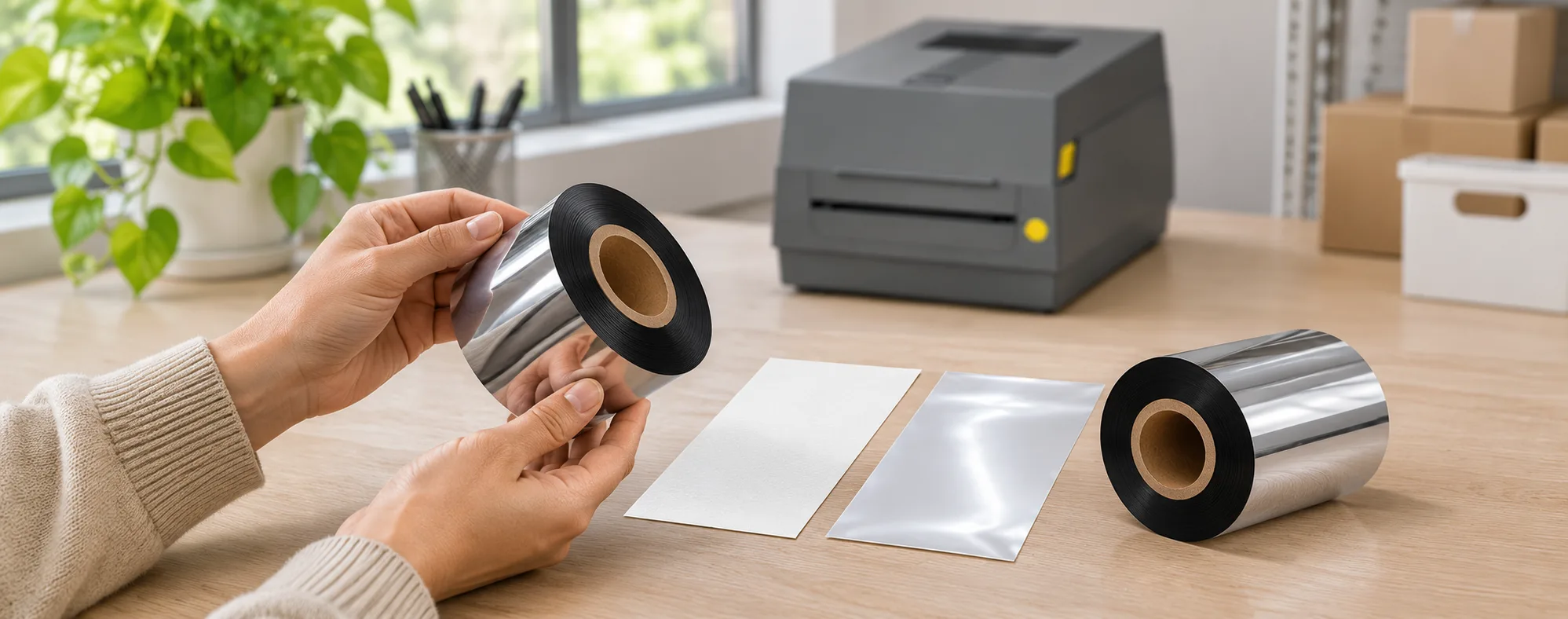
A reliable data capture label starts with a ribbon, label and printer combination that works together. GS1 guidance says ribbon choice is normally determined by the substrate’s ink absorption and smoothness, along with printhead configuration and print speed. Videojet likewise says thermal transfer overprinting performance depends on matching the printer, coded material and ribbon.
For paper labels, a wax or wax-resin candidate may be a practical starting point, but the grade and surface coating still matter. Colorfulttr’s CL-Z109 is described for coated paper, uncoated paper and synthetic paper in flat-head desktop or industrial barcode printers at ≤6 ips; the source also warns that results vary with printer and medium. CL-Z112 is specified for paper labels and tags in flat-head printers at ≤8 inches per second, with cited image-quality, rub-resistance and cold-chamber results obtained on coated paper. These are product-specific descriptions, not universal performance guarantees.
For flexible packaging TTO, do not assume a desktop flat-head ribbon is interchangeable. Check the printer model, ribbon chemistry, winding direction, width and core against the machine documentation. If the ribbon and material produce faint, mottled or incomplete bars, test another documented ribbon and confirm the printhead and settings before deciding the cause.

Test Durability and Scanning in the Real Workflow
A ribbon’s category name alone does not prove that a barcode will remain readable through handling. Define the actual exposure first: rubbing, contact with cleaners, heat, cold storage or other process conditions. Select a product whose documented application fits those conditions, then test the finished label rather than relying on a general material label.
Print representative barcode labels on the exact stock using the intended printer, speed and heat settings. Inspect whether bars and spaces are complete and sufficiently distinct, rub the label as it will be handled, and scan it with the readers used at receiving, picking or asset checks. Keep an approved sample and compare production rolls with it. If scanning is inconsistent, check substrate compatibility, printhead configuration and condition, and print settings before changing ribbon grade.
For a first comparison, Colorfulttr’s listed wax-resin hybrid product is described for various self-adhesive labels and as having greater scratch resistance than wax-based ribbons. That description can help identify a candidate when paper-label handling needs more rub resistance, but a trial on the buyer’s own labels remains necessary.
Data and Evidence
The evidence below identifies selection factors and the stated scope of specific product descriptions. It does not establish that any ribbon works with every printer, label or scanning process.
| Decision | What to check | Evidence and scope |
|---|---|---|
| Label surface | Material, coating, smoothness and ink absorption | GS1 lists substrate properties as a ribbon-selection factor. |
| Printer | Printhead configuration and speed | GS1 identifies both as selection factors; verify the specific printer manual. |
| Candidate product | Documented label and printer conditions | CL-Z109: flat-head, ≤6 ips; CL-Z112: flat-head, ≤8 inches per second. Refer to each product’s stated limits. |
| Acceptance | Print clarity, rub behavior and successful scans | Test on the actual stock and in the intended data capture workflow. |
Before requesting a sample or quote, provide the printer brand and model, printhead type, label material and coating, roll width and core, printing speed, and the label’s exposure after printing. Ask for a candidate matched to those details, then approve it only after a real-media print and scan test.
Frequently Asked Questions
How can I check whether a thermal transfer ribbon will print scannable barcodes on my label stock?
Print on the actual label material with the intended printer and settings, then inspect the bars and scan them with the readers used in your workflow. Check substrate, printhead configuration and speed when results are poor.
What information should I provide to match a ribbon to my barcode printer?
Provide the printer brand and model, printhead type, label material and coating, speed, roll width and core, and the ribbon winding direction required by the machine.
Does a wax-resin ribbon guarantee better barcode durability than wax?
No single category guarantees a result on every label. A Colorfulttr wax-resin product is described as more scratch resistant than wax-based ribbons, but confirm performance on your label and handling conditions.
Recommended products for this industry

3-inch mobile printer
These lightweight and cost-effective 3-inch mobile printers enable accurate receipt and…
View details
4-inch lightweight industrial printer
Industrial printers are engineered for lightweight construction, straightforward…
View details
AL05-A Temporary Number Plate Printer
It can enhance industry productivity, optimise supply chain management, reduce…
View details
AL10-D Dual-Colour Label Printer
It can enhance industry productivity, optimise supply chain management, reduce…
View detailsNeed the right ribbon for your label application?
Share the label material, printer and operating environment. Our team will recommend a tested combination.
